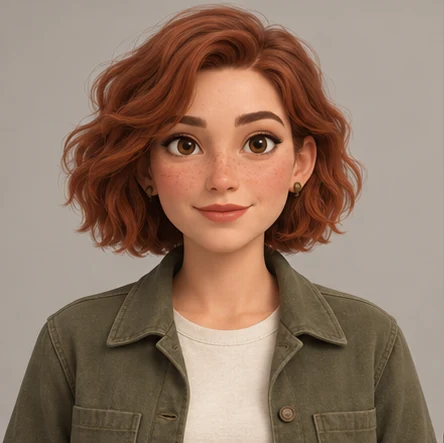
Use a relaxed face as the comparison point for the other portraits.
02
Happy
Show a smile while checking the eyes, cheeks and underlying jaw shape.
03
Sad
Explore lowered brows or a downturned mouth without changing the character’s age.
04
Angry
Change the brows and mouth while keeping distinctive facial features readable.
05
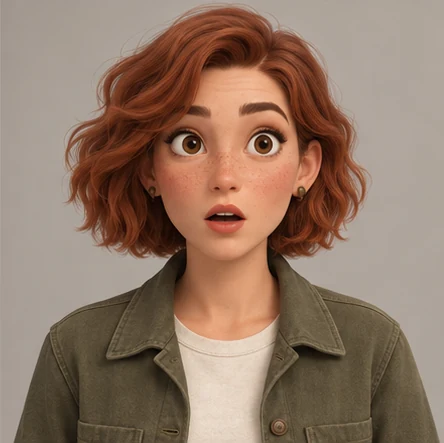
Surprised
Open the eyes or mouth and check that the face still reads as the same character.
06
Thoughtful
Use a quieter expression, gaze or head angle to extend the emotional range.
Plan expressions without losing the character.
Start with the neutral portrait. Keep it beside the stronger emotions so the facial structure remains easy to compare.
Use a similar head crop. Compare eye spacing, nose, jaw and distinctive marks at a similar scale. Head tilt and lighting can affect how a feature reads.
Rename the emotions you need. The online editor supports editable labels. You can replace Thoughtful with Determined or another expression relevant to your story.
Leave missing work visible. An empty panel is a useful reminder. Fill it when you have the artwork; do not reuse an unrelated face just to complete the grid.
MARA / EXISTING STUDIO SAMPLE
Four supplied expressions. Two open slots.
NeutralHappy
Artwork to addSad
Sad · Not supplied
Artwork to addAngry
Angry · Not suppliedSurprisedThoughtful
Existing Mara studio artwork supplies four portraits. Sad and Angry are deliberately blank. This is an assembly example, not a newly generated six-expression set.
Yes. Select a panel in the online editor and rename its label. In the SVG, the labels can also be edited in a compatible vector editor.
Does the template generate emotions from one photo?
No. It arranges portraits you provide. CharaFold’s separate AI expression workflow is in private beta and currently uses a four-portrait preset; this free template has six slots.
Is it free, and where do my files go?
The PNG and SVG downloads and online sheet editor are free, with no account or credits required. The online editor processes your images and notes in this browser tab. Download before closing it; the editing session is not saved.
 CharaFold